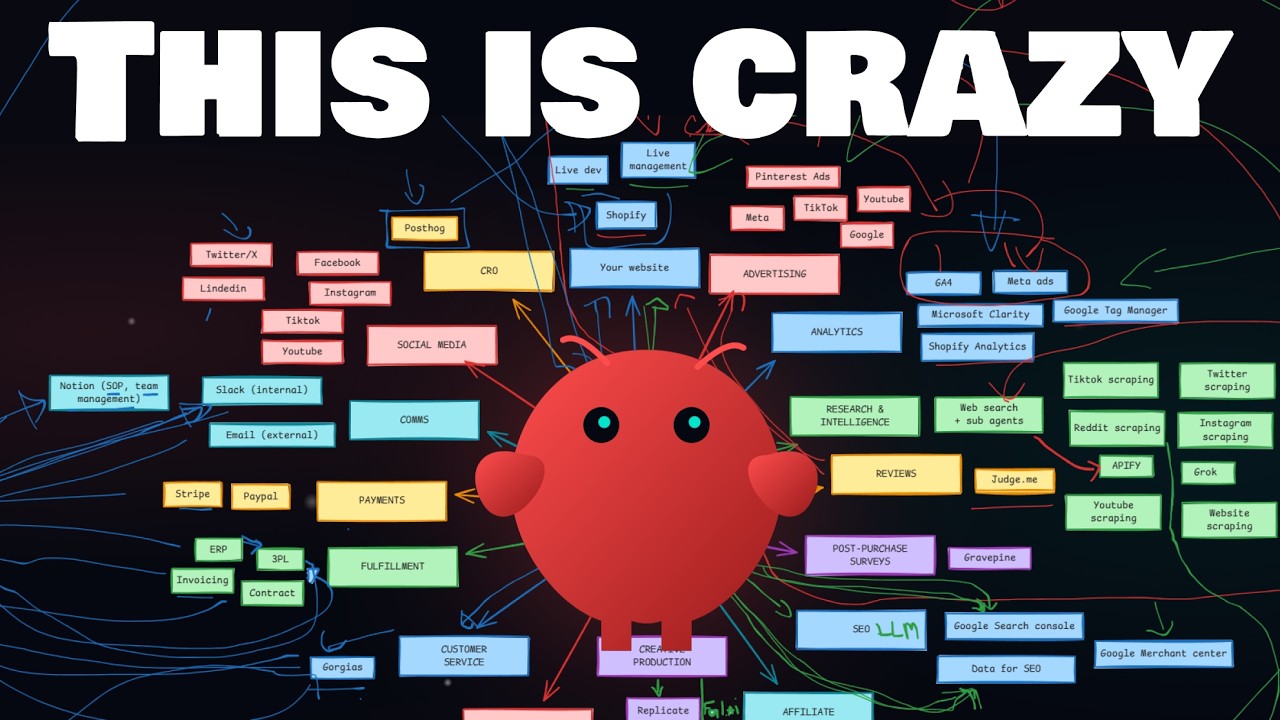
I spend every day deploying OpenClaw agents inside e-commerce businesses. The more tools I connect, the more use cases I discover. It got to the point where I needed to map it all out, just to see the full picture.
This is that map. Not theory. Not “what if.” These are real capabilities that I’ve either already built (about 70%), am confident work (about 20%), or am actively testing (about 10%).
I made a video walking through all of it with a whiteboard. But I wanted to write it down too, because some of this is easier to reference as text. So here’s everything I know, organized the way I think about it.
The one decision that matters at every step
Before I get into the use cases, there’s one concept that comes up over and over: read versus write.
Every time you connect a tool to your agent, you decide whether the agent can only read data or also write and modify things. This applies to everything. Shopify, Meta Ads, email, customer service, all of it.
Read-only is safe and already valuable. Your agent can pull analytics, check orders, research competitors, and answer questions about your business. That alone saves hours.
Write access is where it gets powerful, and where you need to be careful. When your agent can create products, publish ads, send emails, or modify your website, you’re operating in a different league. But one mistake in front of a customer or on a live ad campaign is expensive.
My approach: start with read access everywhere. Let the agent prove itself. Then open write access gradually, tool by tool, as trust builds.
Website development and management
If you’re running a Shopify store (or Webflow, or WordPress), your agent can connect to it through the API. With read access, it sees your products, pages, orders, discount codes, everything. With write access, it becomes a live development tool.
I’m not talking about reckless live editing. The proper way is to develop on a preview theme through GitHub, review the changes, and push to live when you’re satisfied. Your agent handles the code. You handle the decisions.
With write access, the agent can also do live management: create and edit products, verify tags, set up discount codes, create markets. Everything a Shopify admin can do manually, the agent can do through the API. Faster, and without forgetting steps.
Advertising
You can connect Meta Ads, TikTok Ads, Google Ads with YouTube, and Pinterest. I have Meta fully working. TikTok and Google are in process.
With read access, you get all the performance data. Which ads are working, which aren’t, cost per result, creative breakdowns. That’s already a lot.
With write access, the agent can publish ads. Create campaigns, set budgets, upload creatives, launch. This is where it gets serious, because now you’re spending money through an agent. But the potential is obvious.
What makes this interesting is the combination. More on that in a moment.
Analytics
Connect Google Analytics 4, Meta Ads data, Microsoft Clarity, Google Tag Manager, Shopify Analytics. Any tool with an API can be connected.
One thing I’ve learned: you don’t need MCPs for most of this. I never use MCPs and I’ve connected about 70% of everything I’m going to describe. When an API has documentation, the agent reads the docs and figures out how to use it. You just say “can you connect to this?” and it walks you through giving it an API key.
Sometimes the setup is a bit more involved. GA4 requires creating a Google Cloud project. Meta Ads needs a marketing app if you want write access. But the agent guides you through every step. You click buttons, it does the rest.
The first combined use case: ads to landing pages
This is where things start clicking together. You have your website, your ads, and your analytics all connected. Now watch what happens.
Say you’re running 100 ads and you have one landing page. Your top 5 ads are performing well, but they each appeal to slightly different audiences or angles. Normally, you’d need a designer and a developer to create dedicated landing pages for each winner.
With the agent: it reads the ad performance data, reads the comments on your best performing ads, combines that with everything it knows about your brand and website, and creates dedicated landing pages that match each ad’s message. Then it duplicates the ads and points them to the new pages.
This is something that would have taken a team days to coordinate. The agent does it in a conversation.
Research and intelligence
This might be my favorite part. Natively, your agent can search the web. But when you combine web search with sub-agents, you get something close to deep research.
You tell your agent: I want to research this topic. It breaks it into categories. You say: spawn one research sub-agent per category. Each sub-agent goes deep on its piece, and everything comes back to your main agent, which combines the results in the context of your conversation.
The limitation of basic web search is that it can’t read Reddit threads, Twitter posts, or scrape Instagram or YouTube comments. That’s where Apify comes in.
Apify is a hub where developers publish scraping tools. You create an account, get an API key, give it to your agent, and suddenly it can research anything. Find micro-influencers on YouTube and Instagram, scrape Amazon reviews, analyze competitor content, pull Reddit discussions about your niche. All from the same conversation.
One example: “Find 50 micro-influencers talking to people in my niche. Start with YouTube videos that have the most views, find the creators, look them up on Instagram, find similar smaller creators, and give me a complete report.” That’s one prompt. The agent figures out which Apify tools to use, chains them together, and delivers the report.
You can also connect your review system (like Judge.me) and your post-purchase surveys. Now your agent has access to what customers say about your products, what competitors’ customers say, what Reddit says, what Instagram shows, and all of your analytics. The combinations multiply.
SEO (including LLM SEO)
Give your agent access to Google Search Console and a tool like DataForSEO. DataForSEO is an API that provides the raw data behind most SEO tools. Instead of paying for a polished interface and clicking buttons, you give your agent direct access to the source.
Now you can say: based on my website structure and what Google Search Console shows, research DataForSEO and tell me how to improve my SEO. The agent combines your actual search performance with competitive data and creates a plan.
If you’re on Shopify, you can also connect Google Merchant Center for product-specific SEO.
The really interesting part is LLM SEO. Everyone is talking about ranking in ChatGPT and other AI tools. I’m not an SEO expert, but here’s my approach: find the best people writing about LLM SEO, give their content to the agent, and say “learn everything from these experts.” The agent reads their articles, case studies, and recommendations. Then you say: “Now you know the best practices. You have access to my website, my Search Console data, and DataForSEO. Make a plan to optimize my content for AI search.”
It creates the plan. Then you say: do it.
If the agent has write access to your website, it can implement the schema changes, write the articles, use your existing images, and pull knowledge from your reviews and research. All at once.
Email and SMS
Every business sends email. The question is whether your email tool plays well with agents.
From my research, the two best tools for agent use are Resend (made for developers, great for transactional and one-time emails) and MailerLite (full-featured marketing tool with a clean API). Klaviyo works but has limitations, especially around creating automated flows via API.
When your agent has access to your email tool, it can: read your subscriber list, segment by tags, write emails in your tone (by reading your previous emails, not by you teaching it), create HTML templates, schedule campaigns, and report on performance.
The prompt looks something like: “Based on everything we found scraping Reddit about this specific problem, write an email in our tone to talk about our solution. Schedule it for tomorrow at 9 PM. Let me know when it’s done.”
If your current email tool doesn’t have a good API for agent use, that might be a reason to switch. This space is moving fast.
Customer service
This is the one area where I think creating a separate, dedicated agent makes sense. Customer service is customer-facing. Mistakes are expensive. You want an agent that has one mission and does it well.
The setup: connect Gorgias (or your ticket system) to a dedicated CS agent. Then give it access to everything it needs to solve problems.
First, knowledge. The agent reads your brand documentation, your SOPs from Notion, and analyzes six months of Slack conversations to understand how your team works. It reads 200 to 300 past tickets to learn your communication patterns, the words you use, the tone, the resolution approaches.
Then, tools. Shopify for orders and products. Your ERP for fulfillment and logistics. Stripe for payment status. Slack for team context.
When a ticket comes in, the agent investigates: checks the order in Shopify, checks fulfillment in the ERP, checks payment in Stripe, reads related Slack conversations. It builds a complete picture of what happened.
You can even give the agent its own email address. It can reach out to your 3PL directly to ask about a stuck shipment, receive the reply, and resolve the ticket. Zero human touch on routine issues.
The key is the read-versus-write decision again. Start by having the agent research and suggest responses. Graduate to autonomous resolution once you trust it.
Creative production
Your agent can access image and video generation models through tools like Replicate: Kling for video, Nano Banana for images, newer models as they come out. Add 11 Labs for voice generation. Add Remotion (which works as an OpenClaw skill) for video editing and templating. Add UGC tools like Arcads or AgentTopView.
The challenge with creative production is volume. When you’re generating lots of images and videos, managing everything in a chat window gets messy. That’s why I built a web dashboard.
The architecture: your agent creates a simple web application on your VPS using Nginx, password-protected. Connect it to a database like Supabase for storage. Now the agent generates content, stores it in the database, and you browse and select through the dashboard. “I just published 10 videos. Select the ones you like, and I’ll make variations.”
I built this. It works. And honestly, it’s not that hard to set up. You ask your agent how to do it, and it handles the technical side.
Social media
Connecting to Twitter, LinkedIn, and other platforms is possible. Twitter is painful to set up. LinkedIn works fine. You can use scheduling tools like PostIt as an interface between your agent and your social accounts.
But the posting itself isn’t the interesting part. What’s interesting is what the agent posts. It’s not making up content from nothing. It’s creating posts based on everything else it knows: your reviews, your analytics, your research, your email performance, your ad results. A good review becomes a post. An insight from your analytics becomes a thought. An email that performed well becomes social content.
The agent creates from context, not from a blank page.
CRO and AB testing
This is the newest addition to my map, and I haven’t tested it in production yet. But I discovered PostHog, which is a free, open-source analytics and experimentation platform. It’s agent-native, meaning the API is built for programmatic use.
The workflow I’m building: the agent has already learned CRO best practices from experts (same pattern as the SEO section). It creates a page variant optimized for a specific persona. It sets up an AB test in PostHog to split traffic between the original and the variant. It creates a cron job, a scheduled reminder, to check the results in one week. When the data is in, it reports: “Page B won with 5,000 visitors. Want me to make it live?” You say yes. Done.
The whole AB testing cycle, from hypothesis to implementation to measurement to deployment, happens in chat.
What this all means
If you’re a business owner and you’ve been wondering whether AI agents are practical, I hope this map answers that question. Every category I described is either already working or close to it. And the real power is in the combinations: ads feeding analytics feeding landing page creation feeding email campaigns feeding social content, all managed from one conversation with an agent that knows your entire business.
It’s overwhelming. I know. The hardest part isn’t the technology. It’s deciding where to start.
My suggestion: pick one area where you spend the most time on repetitive work. Connect it with read-only access. Let the agent prove its value. Then expand.
The tools exist. The APIs exist. The agent technology exists. The question is just how fast you want to move.